Writer: adminRelease Time: 2025-10-31 09:43Browse: 59
An HMI display is the screen an operator touches two hundred times a shift: machine status on top, alarms in the middle, a row of buttons underneath, and a PLC behind it doing what the operator asks. When the specification is wrong, the failure is never dramatic. It is a panel that washes out under the shop lights at noon, a touch layer that stops registering through work gloves, or a connector that does not mate with the mainboard someone else designed.
This guide is written from the display side of that conversation: what an HMI display actually does in a machine, which five decisions shape the whole project, where capacitive and resistive touch each win, what brightness and temperature ratings mean once the panel is inside an enclosure, and which real modules from 3.5 to 12.1 inch fit which kind of equipment. If you are also specifying a vehicle screen, the same logic in a different domain is covered in How to Choose Automotive Display.
Contents
An HMI display (Human-Machine Interface display) is the visual layer between an operator and a control system. It shows what the machine is doing — temperatures, pressures, cycle counts, fault codes — and takes the operator's input back to the controller. The display itself computes nothing. It presents information and receives touches; the PLC, industrial PC, or dedicated controller behind it does the rest. Wikipedia's overview of the human–machine interface covers the system-level history; this page stays on the screen itself.
In practice an industrial HMI display carries four jobs, and each one leaves a fingerprint on the specification:
A useful way to think about it: an HMI display is a component, not a product. The rest of this article treats it that way.
Size, resolution, brightness, touch, and interface. Almost every HMI display project is settled by these five, in roughly this order — size and interface first, because they are the hardest to change late.
Compact controllers and dedicated machine interfaces usually land between 3.5 and 4.3 inch, where a simple status-and-buttons UI lives. Line-side terminals and monitoring stations go 7 to 10.1 inch, which is enough room for trends, recipe lists, and diagnostics. Anything larger — 12 inch and up — is usually panel-PC territory where the display is one part of a bigger integration. A 4.3-inch 480×272 RGB module such as our 4.3-inch TFT with RGB interface covers the small end; a 12.1-inch 1280×800 LVDS module with capacitive touch covers the large end of a classic HMI panel.
Resolution should be chosen against the UI, not against a datasheet ranking. A 480×272 panel renders a well-designed machine UI perfectly; a 1280×800 panel earns its cost only when the screen shows trends, tables, or multiple windows.
The mainboard team decides this long before the display is chosen, which is why interface is the first question we ask on an HMI enquiry. RGB for classic embedded controllers, LVDS for larger panels and industrial computing platforms, MIPI for compact SoCs, SPI or QSPI where the controller is small and the UI is static. Details in the interface section below.
Indoor enclosures with controlled lighting work fine at 300 to 500 nits. Panels mounted near windows, under skylights, or facing a bright workshop need 800 to 1000 nits plus surface treatment — see brightness and enclosures below.
Gloves, styluses, hygiene rules, and vibration each push the choice differently. Capacitive for modern graphical UIs, resistive where gloves or styluses are the norm, and no touch where a rotary knob or physical buttons are the actual interface. The next section goes through it.
A display inside a fanless steel cabinet in a factory sees a different world from the datasheet's 25 °C. Panels for industrial cabinets should be rated −20 to +70 °C at minimum; outdoor or vehicle-adjacent equipment wants −30 to +80 °C. Our 10.1-inch 1024×600 LVDS module rated −30 to +80 °C at 850 nits is built for exactly this corner.
This is the decision most often made by habit rather than by the application. Three honest options:
| Touch type | Where it wins | Where it loses | Watch out for |
|---|---|---|---|
| Capacitive (PCAP) | Graphical UIs, multi-touch, pinch-zoom on trends, clean glass front for wipe-down cleaning. | Heavy work gloves, wet fingers, EMI-heavy cabinets without proper grounding. | Cover lens thickness and bonding method change glove sensitivity; controller choice affects the mainboard. |
| Resistive | Gloved operation, stylus input, dusty or wet environments, lowest-cost touch. | Multi-touch, high-clarity optics, long-term surface wear at high tap counts. | 4-wire vs 5-wire lifetime; a 4.4-inch CPU module with 4-wire resistive touch is a typical small-controller fit. |
| No touch (knob / buttons) | Appliance knobs, medical device dials, equipment where physical feedback is part of the UI. | Anything that needs forms, lists, or on-screen keyboards. | Round displays change the mechanical design; see the 5.0-inch 1080×1080 round TFT for knob-type designs. |
One note from the field: hybrid designs — a touch screen plus two or three physical keys for the actions an operator does blind — outperform pure-touch layouts in noisy plants. Reserve space for those keys early; retrofitting them into a bonded glass front is painful.
More on touch panel options and construction sits on our touch panel page.
Datasheet brightness is measured with the panel alone, in a dark room, at full backlight. Your equipment adds a cover lens, a bonding layer, sunlight through a window, and glare off a glossy front. Two practical consequences:
First, a 500-nit panel behind an untreated glossy cover can read worse than a 400-nit panel behind an anti-glare, optically bonded front. Surface treatment often buys more readability than raw nits, and it costs less than jumping a brightness class. For screens mounted where sun actually lands — outdoor cabinets, EV chargers, gate terminals — the numbers have to go up: our 12.1-inch 1500-nit wide-temperature module for EV chargers exists because 850 nits was not enough at midday. If brightness control itself is part of the requirement (auto-dimming, night mode), see how to adjust LCD screen brightness.
Second, temperature rating is a system property. The panel's storage range covers transport; the operating range has to cover the cabinet's worst day plus the backlight's own heat. Fanless steel enclosures in a workshop routinely sit 15 to 25 °C above room temperature. The safe rule: ask for the operating range at full backlight, not just the title page, and check where the driver board sits relative to the panel's heat plume. Modules rated −30 to +80 °C, like the 10.1-inch LVDS panel linked above, keep margin for exactly this arithmetic.
Backlight lifetime belongs in the same conversation. An HMI panel runs 12 to 24 hours a day for a decade; LED lifetime (typically 30,000 to 50,000 hours) should be quoted at the brightness you will actually run, not the headline number.
| Interface | Typical fit | What to confirm before committing |
|---|---|---|
| RGB (TTL) | Classic embedded controllers, MCU + FPGA designs, small to mid-size HMI panels up to 800×480 or so. | Sync polarity, clock edge, and timing must match the controller's LCD timing registers — the most common bring-up failure. |
| LVDS | Larger panels (7 inch and up), industrial PCs, long cable runs inside cabinets. | Single vs dual channel, Jeida vs VESA mapping, cable length and impedance. Mapping errors show up as colour noise, not as a dead screen. |
| MIPI DSI | Compact SoC-based terminals, ARM boards, equipment where the processor only exposes MIPI. | Lane count, video vs command mode, and whether the SoC's PHY can clock the panel's rate. |
| SPI / QSPI | Small status displays, controller boards with no display pipeline, static UIs with icons and numbers. | Refresh bandwidth — fine for readouts, hopeless for full-screen animation. |
Electrical details decide integration speed more than the interface name does: connector pinout, signal voltage (3.3 V vs TTL levels), backlight drive (parallel LEDs, current, dimming method), and driver IC register compatibility. Send us the mainboard side early and we will check both halves against each other — the custom LCD/OLED page lists what we need.
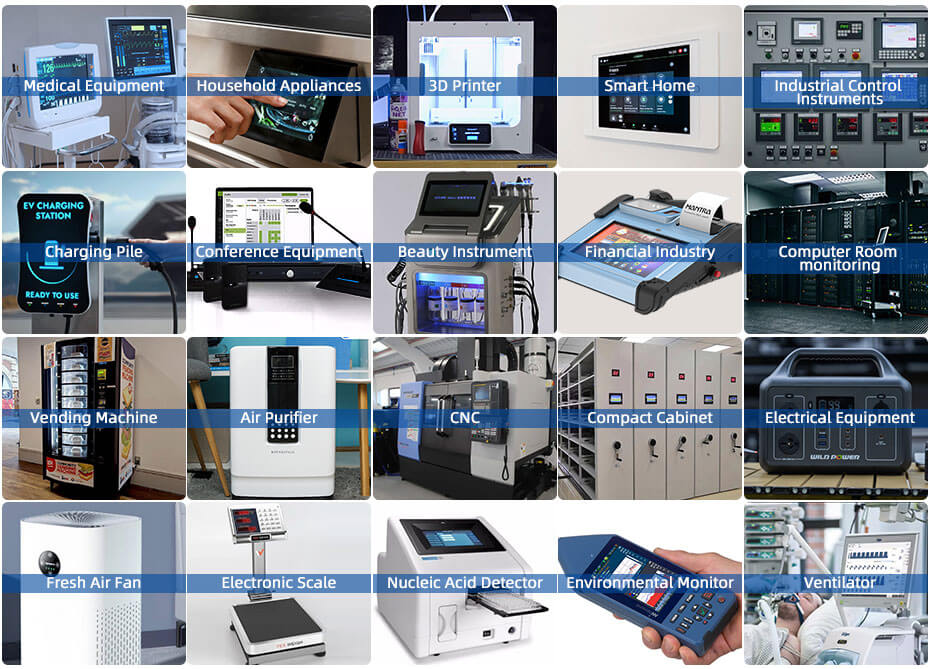
The same five decisions surface in every vertical, but the weighting changes:
Control panels, PLC terminals, CNC interfaces, line monitoring. Operators stand a metre away, gloves are common, and the screen runs all shift. Typical fit: 7 to 10.1 inch LVDS, 800 to 1000 nits, capacitive touch with a rugged cover — or resistive where gloves rule. The 7-inch 1024×600 wide-temperature TFT is a workhorse size here. ISA's ISA-101 standard on high-performance HMI design is worth reading before the UI is drawn; most of its colour and alarm rules only work if the panel's contrast holds up at the operator's angle.
Distribution cabinets, energy monitoring terminals, battery systems, and the outdoor end of the market: EV chargers and gate terminals. Outdoor units push brightness to 1000–1500 nits and wide temperature to −30/+80 °C; the 12.1-inch EV-charger module linked above is the reference case.
Benchtop analysers, patient-adjacent monitors, lab controllers. Readability, wipe-clean fronts, and quiet UIs matter more than raw brightness; display size tends to be 4.3 to 10.1 inch with capacitive touch and a bonded front for cleaning. Documentation and long-term availability weigh heavily in supplier selection here.
Laundry machines, ovens, coffee machines, vending, HVAC panels. Two patterns: full touch on a flat glass front, or a round display behind a rotary knob where the screen rotates with the control. The round knob pattern — a circular TFT turning with an aluminium cap — has become common on premium white goods, and round modules like the 5.0-inch 1080×1080 round display are designed for it. Space-limited equipment also uses stretched-bar formats; see our 10.4-inch 1366×374 bar display for shelf-edge and narrow-panel cases.
Before sending an HMI display enquiry, pin down these answers. They map one-to-one onto what a display supplier needs (and onto our own display FAQ):
| Question | Why it matters | Typical answer pattern |
|---|---|---|
| Size and outline limit? | The module must fit the existing enclosure cut-out, bezel, and mounting points. | "Max 200 × 120 mm outline, viewing area ≥ 165 × 90." |
| Interface on the mainboard? | The least flexible constraint; everything else adapts to it. | "LVDS single channel, Jeida mapping" / "RGB888" / "MIPI 4-lane." |
| Ambient light at the install point? | Sets brightness class and surface treatment. | "Indoor, controlled" → 400–500 nits; "near windows" → 800+; "outdoor" → 1000–1500 + AR/AG. |
| Gloves or bare hands? | Decides capacitive vs resistive vs physical controls. | "Nitrile gloves, 3 mm cover glass, must register." |
| Worst-case cabinet temperature? | Operating range must include backlight self-heating. | "Fanless cabinet, up to 65 °C inside" → −20/+70 minimum, −30/+80 preferred. |
| Volume and lifecycle? | Volume sets unit price and customisation economics; lifecycle sets whether a standard or custom part is safer. | "5k/year for 5+ years, long-term supply required." |
Youritech supplies industrial LCD and touch display modules to equipment manufacturers and system integrators, from 0.23-inch micro OLED up to 20.8-inch bar and panel formats. For HMI projects specifically, the work usually falls into one of four buckets:
To move quickly, send us: size and outline limits, the mainboard interface, brightness and temperature requirements, touch type, and — if the mechanical design exists — a drawing. We will come back with candidate modules and the trade-offs between them. Request a quote or send your requirements.
No. An HMI display is a module — panel plus touch, sometimes a driver board — that gets built into your equipment and wired to your controller. An industrial monitor is a finished device with its own housing and computing. If your product is a machine, you almost always want the module.
Bare-handed, clean environments: capacitive. Heavy gloves, styluses, or dust and coolant spray: resistive, or capacitive with a thin cover lens tested with your actual gloves. If operators work blind on the critical actions, keep two or three physical keys.
400 to 500 nits covers most indoor enclosures. Near windows or under skylights, go 800 to 1000 and add anti-glare. Only direct-sun installations justify 1200+ nits, and those should be quoted together with surface treatment and thermal design.
Yes. Outline dimensions, mounting holes, FPC exit direction, connector position, cover glass shape and printing, and bonding are all customisable. Feasibility and tooling cost depend on volume, so it pays to raise customisation before the mechanical design freezes rather than after.
Size or outline limit, resolution preference, interface, brightness and viewing conditions, touch requirements, operating temperature, annual volume, and the application. A mechanical drawing accelerates everything. Send it via our contact page and you will get candidate modules with their trade-offs, not just a catalogue link.


