Writer: Nilsson AndersRelease Time: 2026-11-25 07:46Browse: 43
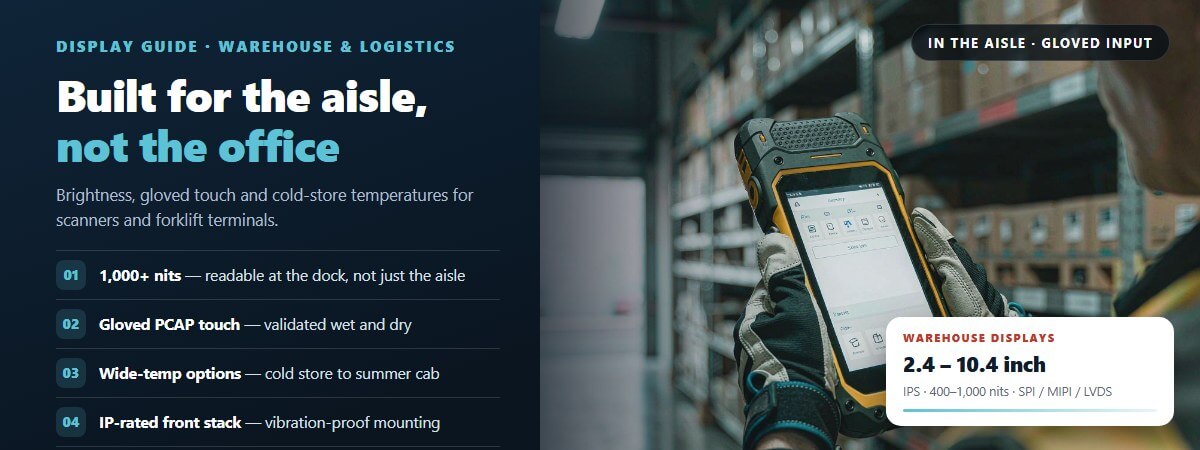
A scanner screen that reads perfectly in the office aisle turns into a smudged mirror under the loading-dock lights. A forklift terminal that works fine on Monday can refuse touch input in a −18 °C cold store on Friday. Warehouse displays fail at the edges of the building, and display selection has to start from those edges, not from the spec table.
This guide separates the two device families — handheld scanners and forklift-mounted terminals — because they punish different weaknesses. It covers size and resolution trade-offs, brightness against warehouse lighting, glove-capable touch, cold-store temperatures, what an IP rating actually covers, and the interface decision that ties the module to the mainboard. For the consumer side of the same small-screen logic, the guide to handheld gaming and wearables displays works through PPI and power in a different context.
Contents
Both device families live in warehouses, but a shared building is where the similarity ends.
Barcode reading, inventory checks, picking, receiving, package tracking — for hours, walking, one-handed, often gloved. The display has to stay legible in motion, respond instantly through a cover lens that takes daily abuse, and sip power so the shift does not end before the battery does. Most designs land on compact TFT LCD modules; the UI, enclosure and battery capacity decide the exact size.
A terminal bolted inside a cabin or on a bracket is a different animal: bigger screen for WMS screens and task lists, brightness high enough for sunlight through the cab window, touch that still registers while the vehicle bounces over dock plates, and mechanical integration that survives vibration all shift long. Terminals that serve outdoor yards or cold-storage facilities add temperature extremes on top. The vehicle-mount context has much in common with other in-cab displays — the automotive display requirements overview walks through the same vibration, brightness and temperature logic.
Size sets readability, interaction style, enclosure volume, weight and cost — all at once. The table below reflects common design practice, not standards:
| Application | Common Size Range | Typical Considerations |
|---|---|---|
| Compact handheld scanner | 2.4–3.5 inch | Small enclosure, basic information display |
| Full-touch handheld terminal | 4–6 inch | Inventory UIs, text, touch operation |
| Rugged handheld computer | 5–7 inch | Denser information and application interfaces |
| Forklift terminal | 7–10.4 inch | Vehicle-mounted operation at arm's length |
| Industrial vehicle terminal | 10.4 inch and above | Multiple information panels side by side |
Resolution follows the same "enough, not maximum" logic. For a handheld scanner, sharp text and legible barcode feedback matter more than pixel density records — a resolution that renders the UI cleanly without inflating SoC and memory cost is the right answer. A forklift terminal is different: it often shows task lists, maps and WMS panels simultaneously, so higher resolution buys usable screen real estate and cleaner interface organization, provided the mainboard can drive it.
For a worked example of matching resolution to a vehicle-mounted, sunlight-exposed use case, see the cycling computer display guide — same physics, smaller vehicle.
Warehouse lighting is a moving target: LED high-bays indoors, open sky at the dock, direct sun through a cab window. A panel tuned for the office fails at the perimeter. Reference ranges for comparing modules:
| Brightness | Potential Application |
|---|---|
| 300–400 nits | Indoor warehouse handhelds |
| 400–600 nits | General-purpose industrial handheld terminals |
| 600–1,000 nits | Bright indoor and semi-outdoor use |
| 1,000+ nits | Outdoor, sunlight-readable forklift terminals |
Indicative, not guaranteed — readability is a property of the whole optical stack. A 500-nit panel with effective anti-reflection treatment can beat a brighter module with glossy glass. Anti-glare surfaces tame high-bay reflections; optical bonding removes the internal air-gap reflection for high-ambient-light use, at the cost of process control and repair considerations. For the underlying physics, the high-brightness drone display guide and the note on adjusting LCD brightness both apply directly. An example of squeezing 800 nits into a compact module is the 2-inch 800-nit AMOLED with on-cell touch.
Gloves, wet cartons, dust — warehouse input conditions are hostile by default. The touch stack has to match them.
Projected capacitive touch is the default on modern handheld terminals: fast finger input, multi-touch, smooth glass, and glove support when the controller, cover glass thickness and grounding are designed for it. Glove mode is not a checkbox — it has to be validated with the actual gloves, wet fingers and cover lens of the final product. See the touch screen product line for integration-ready PCAP examples such as the 4.2-inch TFT LCD with capacitive touch.
Resistive sensing responds to pressure, not conductivity, so it shrugs off thick work gloves and any stylus. The trade-offs are optical clarity and no real multi-touch. For pressure-based terminals it remains a legitimate choice — the 4.4-inch module with 4-wire resistive touch shows the construction.
| Requirement | Capacitive Touch | Resistive Touch |
|---|---|---|
| Finger operation | Excellent | Good |
| Multi-touch | Supported | Generally not supported |
| Glove operation | Depends on controller and glove type | Generally suitable |
| Stylus input | Depends on controller | Suitable with compatible stylus |
| Optical clarity | Generally higher | Depends on construction |
| User experience | Smartphone-like | Pressure-based input |
The general behavior of both sensing principles is covered in Touchscreen — useful background when discussing controller options with your touch supplier.
Nobody looks straight at a warehouse screen. The scanner tilts mid-scan; the forklift terminal sits off to the side of the operator's sight line. Wide viewing angles keep text readable from those positions, which is why IPS TFT LCD dominates industrial handhelds and vehicle displays: stable contrast and color across a wide cone, consistent text rendering, and availability in the sizes warehouse products actually use. IPS panel options span the full range from 2.4 to 10.4 inch.
TFT LCD or AMOLED? For conventional warehouse hardware, TFT LCD is the sensible starting point — broad module availability, mature supply, flexible configurations. AMOLED earns consideration for specialized handhelds that need deep blacks, high contrast or a slim structure, but its brightness behavior, power profile and long-term operating conditions must be evaluated against warehouse duty cycles; the OLED display family (technology background in AMOLED) is the place to start that comparison.
A handheld terminal walks between a climate-controlled aisle and an outdoor dock. A forklift terminal bakes in a summer cab, then works a cold-store shift. Liquid-crystal response slows, backlight output drops and touch controllers misbehave as temperatures fall — none of which shows up in a room-temperature demo.
Confirm operating and storage temperature ranges, low-temperature LCD response, backlight behavior when cold, touch controller limits, and condensation risk when a device moves from −18 °C storage into warm, humid air. Cold-store hardware should be tested as a complete device at the real temperatures — panel, touch, battery and enclosure together. Modules specified for extended ranges exist: see wide-temperature display options, including the 7-inch high-brightness wide-temperature AMOLED.
Warehouse terminals take hits, dust, rain at the dock and constant vibration. But durability is a property of the whole front-end structure — cover glass, touch sensor, adhesive, housing, mounting and connectors — not the LCD cell alone.
For handhelds: glass thickness, surface hardness, scratch resistance, edge protection, adhesive reliability, and touch performance through the chosen cover lens. For forklift terminals: the mounting structure is part of the display's survival system and should isolate vibration rather than transmit it.
IP codes (IP65, IP67, and so on) describe the tested enclosure — the assembly. A handheld terminal achieves IP65 through its housing, front panel, connectors and sealing. A standalone LCD module does not inherit that rating. Plan the sealing around the module, and verify on the finished device.
Forklift-mounted displays should be evaluated for the shock and vibration profile of vehicle operation. Module, FPC, connectors and mounting work together to prevent connection failures; test the complete terminal, not the bare panel on a bench.
For battery-powered handhelds, the display is a leading item in the power budget, and backlight brightness is the biggest lever: every brightness step costs runtime. Review typical and maximum display power, backlight dimming range, LED driver efficiency, operating voltage and current, automatic brightness control, and expected daily operating hours. A panel that meets the brightness spec but halves shift time is not a candidate.
Forklift terminals usually draw from the vehicle's electrical system, which moves the problem: input voltage range, regulation, and protection against load dumps and electrical disturbance become system-level design items rather than display specs.
Interface selection belongs in early hardware design, not after the enclosure is frozen:
| Interface | Typical Characteristics | Design Considerations |
|---|---|---|
| SPI | Simple serial communication | Suits low-resolution, low-data-rate displays |
| RGB | Parallel pixel data transmission | Timing and signal routing need care |
| MIPI DSI | High-speed serial display interface | Requires a compatible controller and mainboard |
| LVDS | Differential signal transmission | Common in industrial embedded systems |
| eDP | High-speed embedded display interface | Requires an eDP-ready system architecture |
Compact scanners typically land on SPI, RGB or MIPI DSI depending on size and system architecture; larger vehicle terminals lean toward LVDS or eDP. Two things to keep straight: the display interface is separate from the barcode engine's interface, and the module only presents what the device's software generates — it does not process scans. Before selection, confirm pin definition, connector type, signal timing and FPC layout against the mainboard; the LCD controller board lineup bridges most combinations, and the industrial context is covered further in the HMI display guide.
| Selection Item | Questions to Confirm |
|---|---|
| Application | Handheld scanner or forklift-mounted terminal? |
| Screen size | Compact or larger display — and does it fit the enclosure? |
| Resolution | How much information must be on screen at once? |
| Brightness | Indoors, outdoors, or both? |
| Touch type | Capacitive or resistive? |
| Glove operation | What type and thickness of gloves? |
| Viewing angle | Will operators view from off-axis positions? |
| Temperature | Cold storage, outdoor yards, hot cabs? |
| Protection | What enclosure-level IP rating does the product need? |
| Mechanical | Dimensions, thickness, FPC position compatible? |
| Interface | Does the display match the mainboard? |
| Power | Battery or vehicle power budget satisfied? |
Closing these questions before prototype build costs hours; closing them after tooling freeze costs months.
Standard modules rarely land exactly on a warehouse device's requirements. Size, brightness, touch structure, connector position and thickness usually end up negotiated against the enclosure and mainboard. Youritech provides LCD and touch display solutions for industrial and consumer applications — see the custom LCD and OLED service and solutions by application.
For warehouse scanner and terminal projects, customization typically covers:
Evaluate the display as part of the complete device — mainboard, enclosure, power system, operating environment. If you are developing a handheld scanner, rugged mobile computer or forklift-mounted terminal, contact Youritech to discuss your requirements.
Request a Quote / Get a Custom Display Solution
Compact scanners commonly use 2.4–3.5-inch displays; full-touch handheld terminals usually land on 4–6 inches. The right size depends on the UI, enclosure dimensions and how the device is held during a shift.
300–500 nits can suffice in controlled indoor conditions; bright warehouses and outdoor loading areas usually need 800–1,000 nits or more. Anti-glare treatment and optical bonding improve visibility further.
Yes, but glove compatibility depends on the touch controller, cover glass thickness, glove material and grounding. Validate the complete touch stack with the actual gloves warehouse operators wear — not with a datasheet claim.
Yes. IPS TFT LCD provides wide viewing angles and stable image appearance, which matters when the terminal is mounted off the operator's direct line of sight.
An IP65 rating applies to the tested enclosure or assembly. A complete terminal reaches IP65 through its housing, front panel, connectors and sealing structure. A standalone LCD module should never be assumed to carry the same rating.
SPI, RGB and MIPI DSI are all viable depending on resolution, data rate, driver IC and mainboard design. Confirm the choice during early hardware development, before the enclosure is fixed.
Yes. Dimensions, brightness, resolution, touch integration, cover glass, FPC layout and interface configuration can all be customized subject to technical feasibility.
Warehouse display selection is a balance of readability, touch behavior, durability, power and system fit. Handheld scanners reward compact size, responsive gloved touch and battery efficiency; forklift terminals need larger screens, sustained high brightness, wide viewing angles and vibration-proof mechanical integration. Define the working environment and hardware constraints early, and the display will support the shift instead of interrupting it.


