Writer: Andrew MartinRelease Time: 2026-11-04 06:19Browse: 6
 Almost every piece of modern medical equipment has a screen. On a handheld diagnostic device it may be two inches across; on an ultrasound cart it may be a 12 or 15 inch panel. Either way, it is the surface through which someone reads a measurement, looks at an image, checks whether the device is running correctly, or changes a setting.
For an equipment manufacturer, choosing that screen is not a matter of picking a size. Resolution, brightness, viewing angle, interface, touch, power draw and mechanical dimensions all have to line up with the device design at the same time, and usually before the enclosure is fixed.
The sections below cover what the term healthcare display actually includes, where these modules are used, and what is worth checking before a part number goes on the bill of materials.
Contents
A healthcare display is a display module built for integration into medical equipment and healthcare-related devices. It presents patient readings, diagnostic images, test results, operating parameters and device status.
The term covers a wide spread of products. A small TFT LCD inside a portable monitoring device has almost nothing in common, specification-wise, with the panel in a medical imaging system. Some applications need a screen that shows four numbers; others need high resolution, a large active area and touch input.
For the display supplier and the equipment developer, the useful question is not what the screen is called but how it will be used inside the finished device. Its specifications have to work with the hardware platform, the software interface, the mechanical structure and the environment the device operates in.
Display choice also affects usability, which is part of the device design record rather than an afterthought. The FDA guidance on applying human factors and usability engineering to medical devices treats the user interface, including what appears on the screen, as part of use-related risk analysis. Readability at the actual viewing distance belongs in that discussion.

Healthcare equipment spans a lot of product categories, and each one puts different demands on the screen. The five below cover most of what we see in project enquiries.
Ultrasound systems, X-ray equipment, endoscopy systems and similar imaging devices use displays to present diagnostic images and the information that goes with them.
These applications can require higher resolution, brightness, contrast and viewing angle than a status display, and the screen size follows from the equipment design and from how far the user sits or stands from the panel. A portable ultrasound unit may use a 7 inch display to balance image area against portability, while a cart-based system may need 12.1 inches or more.
Imaging also brings a requirement that ordinary equipment does not. For grayscale images, the DICOM PS3.14 Grayscale Standard Display Function describes a standardized approach to grayscale presentation. A standard TFT LCD module should not be assumed to meet diagnostic display requirements without system-level evaluation and calibration. For the wider picture, our guide to medical imaging displays goes through it in detail.
Patient monitors show heart rate, blood pressure, oxygen saturation and ECG waveforms, usually several at once, alongside alarms and trend data.
The display has to keep text and graphics readable at the distance people actually stand from the bed, which makes viewing angle, brightness and screen area more important than pixel count. Compact monitors often use small TFT LCD modules; bedside systems move up in size as the parameter count rises. Our patient monitor display guide covers the specification detail for this category.
Blood analyzers, biochemical analyzers and similar instruments use displays for test results, measurement values, operating instructions and system status.
Here the screen is often the control interface as much as the readout. A touchscreen makes it easier to select test settings, enter sample information and move through menus; physical keys still make sense where gloves or contamination are a factor. Sizes range from a compact 2.4 or 3.1 inch panel on a small instrument to a larger display on a benchtop analyzer with a full menu structure.
Anesthesia machines, infusion pumps, ventilators and endoscopy towers use displays to present operating parameters and device status, and in many cases to accept input directly.
Requirements vary widely within this group. Some devices need only a compact screen for a few readings; others need a large touch display with detailed graphics. Mechanical integration tends to decide the project earlier than optics does: available installation depth, panel thickness, connector position and mounting structure are worth checking before the enclosure design is signed off.
Portable diagnostic and monitoring products have limited space and a finite battery, so the display is usually the component that sets both limits.
Handheld instruments, portable ultrasound devices and compact monitoring products may use small TFT LCD, AMOLED or PMOLED modules, depending on how much information has to be shown and how the product is powered. On battery-operated equipment, power consumption deserves as much attention as brightness and size, and the interface and connector have to match the mainboard that was already chosen.
TFT LCD and OLED are the two families considered for embedded equipment, and within each there are variants that behave differently. The right answer depends on the application, not on the technology label.
TFT LCD modules are used across embedded products because they come in a very wide range of sizes, resolutions and interface configurations.
Depending on the model, manufacturers can select brightness level, viewing angle class and touchscreen option. Common interfaces include RGB, TTL, SPI, MCU, LVDS and MIPI, which means most hardware platforms can be matched without adding a converter board. The technology suits everything from compact diagnostic instruments to larger monitoring and control systems, and supply tends to be more predictable over a long equipment life cycle than newer panel types.
IPS is a type of LCD with wide viewing angles, useful where the same screen is read from different positions, as on shared monitoring equipment or a clinical control terminal.
One caution: the label alone does not guarantee the number. Check the module's actual L/R/U/D viewing angle figures, plus brightness and contrast, rather than assuming an IPS panel will behave like every other one. Two modules both described as IPS can differ noticeably off-axis.
AMOLED panels use self-emissive pixels, so each pixel produces its own light. That gives high contrast, deep blacks and fast response, and it removes the backlight stack, which helps with module thickness.
The compact structure suits handheld equipment and products with detailed graphical interfaces. The trade-offs are worth stating plainly: brightness under strong ambient light, operating lifetime, power consumption at high brightness, and long-term image retention all need to be checked against how the device will really be used. A demo room is not a ward.
PMOLED is the other OLED family used in compact applications, typically for small devices that show numeric values, symbols, icons and basic operating information.
Between PMOLED, AMOLED and TFT LCD, the deciding factors are screen size, content complexity, power budget and the overall product design. The technology comparison behind those decisions is covered in more depth in our article on LCD versus OLED for medical devices.
A module can look right on paper, at the right size and the right resolution, and still fail an integration review. These are the seven points worth settling before samples are ordered.
The screen has to leave enough room for the information the device needs to show, plus whatever the software team adds later.
Small panels suit readings and status information. Larger panels make sense when the interface carries multiple parameters, waveforms or images. Resolution should be judged together with size and viewing distance, not on its own — a higher pixel count is not automatically an improvement if nobody stands close enough to resolve it.
Brightness determines whether the screen stays readable in the lighting the device actually meets. A unit in a brightly lit clinical area needs a different level from one used in a dimmed room, and a transport device carried outdoors needs more again.
Contrast ratio affects how cleanly text, icons and graphical elements separate from the background. Both figures should be set from the intended operating environment rather than from the highest number on a datasheet, because brightness costs power and backlight life.
Where several people read the same screen from different positions, viewing angle moves up the list. IPS modules are usually the starting point for these applications.
Check the actual left, right, up and down specifications for the module in question, along with how the image degrades at the edges of that range. A published 85/85/85/85 is a measurement condition, not a promise that the image looks the same from every seat.
Some devices need touch, some are better served by physical buttons, and some use both: hard keys for the functions reached under pressure, touch for everything else.
Available options include capacitive, resistive, in-cell and on-cell touch. The choice depends on the user interface, the cover lens design, the operating environment and how the module integrates mechanically. Resistance to repeated cleaning with disinfectants belongs in that decision too. Our notes on capacitive touch displays cover the integration side.
Interface compatibility is one of the first things to confirm, because it is expensive to discover late. The common options in medical equipment are:
The interface has to match the host processor or display controller. Connector pin assignment, signal timing, voltage levels and driver support should be confirmed during hardware development, not during the pilot build.
Whatever space exists inside the enclosure decides which modules are even candidates. Outline dimensions, active area, thickness, mounting points and connector position all need checking against the drawing.
This matters most in two situations: replacing a display in an existing product, where the new module has to drop into an old opening, and designing a new enclosure, where a few millimetres of thickness change the whole industrial design.
On portable equipment the display is often one of the larger loads, so its consumption affects battery life and the power architecture around it.
Operating temperature matters just as much. The module's rated range should cover both the working and storage conditions the device will meet, including transport in a cold vehicle or storage in a warm room. Review these figures alongside the device's thermal design rather than in isolation.
Our range covers compact TFT LCD modules through to larger touchscreen displays, in the sizes and interface configurations that healthcare equipment tends to need. Four examples from the current line are below; the full list sits in our TFT LCD display catalogue.
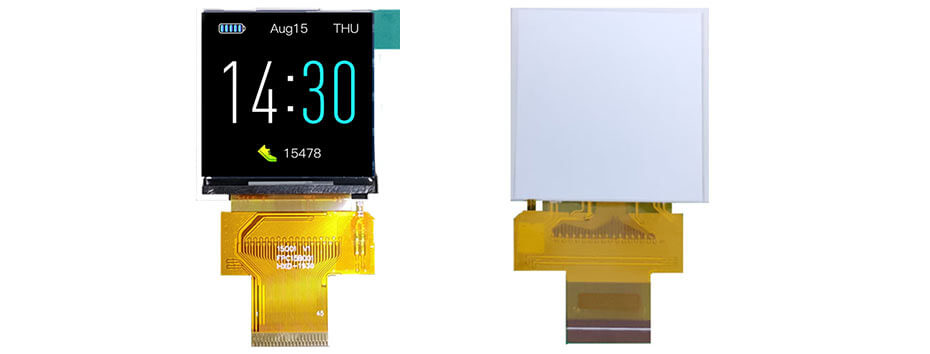
ET015SQ01-K is the smallest of the four, a 1.54 inch square module with a 240×240 resolution and CPU, RGB and SPI interface options. It suits handheld instruments, meters and status displays where the content is a few readings or an icon set. View ET015SQ01-K
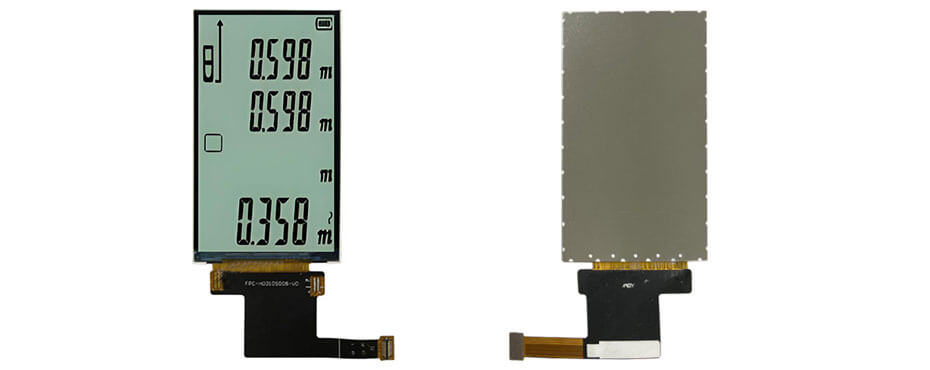
ET031WV01-H is a 3.1 inch portrait panel at 480×800, driven over MIPI, with 450 cd/m² and 80/80/80/80 viewing angles. Portrait format fits handheld diagnostic devices and instruments where a vertical list is the natural layout. View ET031WV01-H
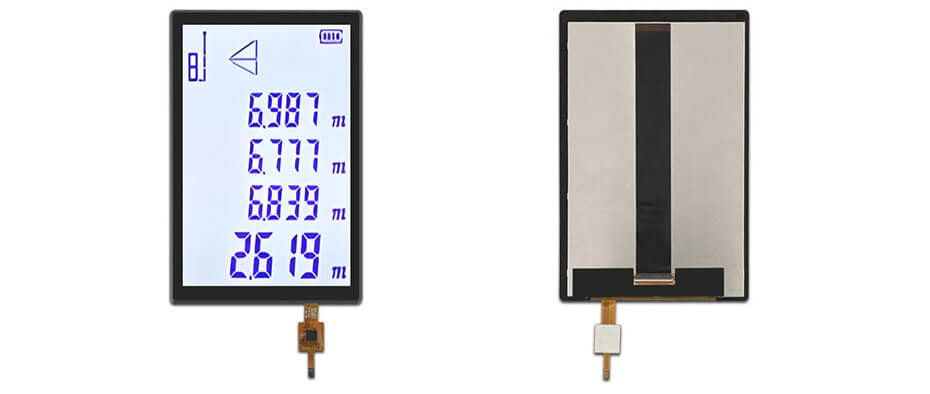
ET070WU13-TT is a 7 inch IPS panel at 1200×1920 with MIPI input, 1500 cd/m² and a 1200:1 contrast ratio. The high brightness and 85/85/85/85 angles make it a candidate for handheld imaging devices and equipment used near windows or outdoors. View ET070WU13-TT
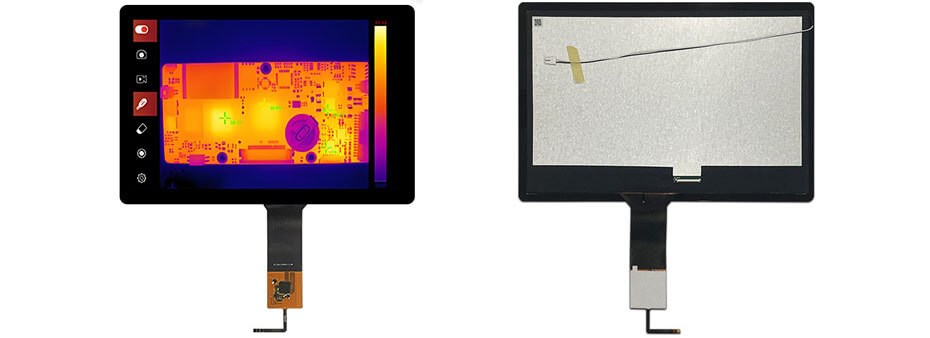
ET121WX05-TT is a 12.1 inch 1280×800 panel on LVDS with capacitive touch and 750 cd/m². The size and interface suit bedside monitors, imaging consoles and benchtop analyzers where the interface carries several parameters at once. View ET121WX05-TT
These four cover different corners of the range rather than a recommended shortlist. Final selection should follow the hardware, mechanical and environmental requirements of the specific project, and a module that fits one device will often be wrong for the next.
Standard modules do not always fit a new medical device. Some projects need a resolution that is not in the catalogue, a non-standard screen size, a specific interface, or a touchscreen bonded into the front panel.
We work with customers on display selection and customization against the project specification. Depending on the design, that can include:
When opening a new project it helps to have the display size, resolution, interface, touch requirement, operating temperature and available installation space on the table. Those five answers usually narrow the field to a handful of modules and surface the integration problems early, while they are still cheap to fix.
One boundary worth being clear about: for the equipment manufacturer, the display module is one component of a finished device. Medical device standards and regulatory requirements apply to the complete equipment and have to be assessed at that level. IEC 60601-1, for example, sets out general requirements for basic safety and essential performance of medical electrical equipment, and it applies to the device as a system rather than to the panel inside it.
Healthcare displays are integrated into patient monitors, ultrasound systems, laboratory analyzers, portable diagnostic instruments and surgical equipment. They present measurements, images, operating information and user interface controls.
The difference lies in the application and the system requirements around it. A display used in medical equipment may need particular brightness, viewing angle, interface, operating temperature and mechanical characteristics. A standard LCD module can be suitable for some equipment designs, but it should not be treated as a diagnostic-grade display without evaluation at system level.
Neither suits every application. TFT LCD offers the broader choice of sizes and interfaces; AMOLED gives high contrast and a thin self-emissive panel. The decision should follow the display content, power budget, brightness requirement, operating conditions and cost target.
Yes, within limits set by the project and by production feasibility. Customization can cover screen dimensions, resolution, brightness, interface, touchscreen configuration, cover lens and mechanical structure.
Screen size, resolution, interface, brightness, touch requirement, operating temperature, mechanical dimensions and estimated project quantity. A reference drawing or an existing display part number helps as well, particularly for replacement projects where the new module has to fit an established opening.
Selecting a display for medical equipment starts with how the screen will be used and how it connects to the rest of the system. Once those two are settled, the module list gets short quickly.
Youritech supplies TFT LCD and other display technologies in a range of sizes and configurations for embedded equipment. If you are developing a new healthcare device or looking for a replacement module, send your specifications through our contact page and we will come back with options and integration notes.
Contact Youritech for a display solution.


