Writer: Andrew MartinRelease Time: 2026-11-05 06:30Browse: 7

A bedside monitor in an ICU is read by a nurse standing at the bed, a doctor walking past the door, and a colleague watching the central station two floors away. Three people, three distances, one screen. That constraint shapes display choice more than any single figure on a datasheet.
This guide covers where displays sit inside patient monitoring equipment, what the screen is actually asked to do, and the specifications worth locking down before you request samples. Most of it applies to vital signs monitors as well; the differences are noted where they matter.
Contents
Patient monitoring covers four quite different product families: bedside monitors, transport monitors, compact vital signs devices and central stations. Each places the display in a different position — physically, and in the user's attention. Panel size and layout follow from that, not from a standard parts list.
A ward or ICU bedside monitor is a multi-parameter instrument. ECG and pleth waveforms, heart rate, SpO₂, NIBP, respiratory rate and temperature normally share one screen, alongside alarm banners that must never be mistaken for a parameter reading.
The thing that runs out first is screen area, not pixel density. Six waveform channels on a 10-inch panel look crowded no matter how good the glass is. This is why bedside units climb to 12.1, 15 or 19 inches once the channel count goes past four.
Layout matters as much as the panel. The number a nurse glances at from the doorway has to sit in the same place on every unit in the department, otherwise the glance is useless. If the UI reflows between firmware versions, no panel choice will rescue it.
Transport monitors live on a pole, in an ambulance or in a corridor. Size, weight, thickness and power draw come before image quality. A 1000 cd/m² panel that flattens the battery in ninety minutes is a bad engineering decision, however good it looks in a demo room.
Daylight readability and battery life pull in opposite directions, and the trade-off is clinical rather than optical: how long does the device leave the wall, and where does it go. Answer that before choosing a brightness class.
Smaller is not automatically better either. Compress a five-parameter layout onto 5 inches and the numerals shrink until staff start leaning toward the screen, which defeats the purpose of a portable device.
Vital signs monitors are narrower by design: four or five parameters, large numerals, often a trend view. Some use color TFT; some still use monochrome or a small OLED where cost, sunlight readability or power dominate.
Decide on color early. It changes the module, the driver, the bill of materials, and usually the interface design with it. Switching from mono to color halfway through a project is not a component change, it is a redesign.
A central station is a different product with a different problem. It aggregates eight, sixteen or thirty-two beds, so the limiting factor is how many data regions can be laid out legibly, not waveform fidelity for one patient.
Worth stating plainly: the final interface is system design. The LCD supplies a canvas and a pixel budget. It will not fix an information architecture that tries to show too much at once.
A patient monitor display has four jobs: make numbers readable at a glance, keep waveforms distinguishable while they scroll, stay legible in both a bright room and a dim one, and support several people reading from different positions. Everything else is secondary.
Numbers are the most-viewed element on the screen and the one most often compromised. A 1920×1080 panel displaying 4 mm digits is worse than a 1280×800 panel displaying 10 mm digits. Resolution only helps when the interface spends it on the things people read.
Ask what the viewing distance is. Half a meter at the bedside and three meters across a room are different design targets, and the second one sets the minimum numeral height, not the datasheet.
An ECG trace is a thin moving line. It needs enough vertical resolution per channel and consistent refresh timing. The panel supplies pixels; the main board supplies timing.
Be explicit with your supplier about which part belongs to the module. The LCD does not measure, filter or interpret a signal. When a trace tears or flickers, the cause is usually timing, cabling or signal integrity rather than the glass.
Test at a real sweep speed and real amplitude. A static test image hides precisely the artifacts you are looking for.
Hospitals are not one lighting condition. A ward at night, a bed beside a window at noon and the back of an ambulance are three different targets.
Around 500 cd/m² is a sensible indoor figure. Anything meant to be read in daylight wants 800–1000 cd/m² with an anti-glare treatment, and pays for it in power and backlight hours. Contrast matters most for thin lines against dark backgrounds, and it is the specification most often quoted from a dark-room measurement that has little to do with a lit ward.
Wide viewing angle is a genuine requirement here rather than a marketing line. IPS is the usual answer; a TN panel visibly washes out for whoever is standing at the head of the bed.
Check all four directions, and check the actual module under ward lighting. An 89/89/89/89 claim still deserves a look with your own interface on the screen.
Color coding helps staff scan a screen quickly, and it only works if it is consistent across units: a nurse trained on one monitor reads the next one the same way.
Color should never be the only carrier of an alarm state. Multi-parameter monitors are used by color-blind clinicians, so shape and text carry the message while color supports it. Alarm logic is device-level and sits under the IEC 60601-1-8 collateral standard; the display renders what the system gives it.
Six decisions determine most of the shortlist: size and resolution, TFT versus OLED, interface, touch, operating temperature, and power. Settle them in that order. Work backwards and you will re-quote twice.
Size sets the usable viewing area; resolution sets how much detail fits inside it. The right combination comes from five inputs:
Sketch the layout at 1:1 before choosing. If the design needs 1280×800 and the shortlist starts at 800×480, you find out on paper instead of in a prototype.
TFT LCD covers patient monitors almost end to end: 3.5 to 15 inches and beyond, TTL, LVDS, MIPI and HDMI, brightness and touch options, and long production availability.
OLED earns its place in small instruments and secondary status displays, where contrast and thickness matter and the screen is not on for twelve hours a day. For a continuously operating bedside monitor, ask about burn-in and lifetime before you ask about contrast.
Don't select on contrast ratio alone. Backlight life, power, cost curve and supply continuity decide more monitoring projects than black level does.
Match the module to the board, not the other way round. If the SoC has one MIPI-DSI port and your shortlist is LVDS, you have just added a bridge chip, a power rail and a new failure mode.
Confirm timing, lane count, logic voltage and connector pinout while the mechanical drawing is still editable.
Some monitors are touch, many are not. Gloved transport use, wet hands in an operating room and workflows where a knob is simply faster all argue for hardware controls.
If touch is in scope, settle capacitive versus resistive, controller interface, cover glass thickness, glove operation and cleaning. Alcohol wipes are used daily on these devices, and repeatedly. Bonding, grounding and cover lens design decide whether touch behaves inside the enclosure; the panel specification alone does not.
For battery-powered devices, agree the backlight current budget before anything else gets designed. It is usually the largest load on the rail after the processor.
The temperature range has to cover transport and storage, not just the ward. -20 to +70 °C is common for modules, but check that brightness and response time still hold at the cold end. Also ask for backlight lifetime to half brightness, typically 20,000 to 50,000 hours, and for component longevity: a monitoring program runs five to seven years, and a panel that reaches end of life in year two is an expensive redesign.
The table below is a starting point, not a specification. Real projects move these figures by a size or two depending on the layout and the enclosure.
Two modules from our range illustrate the two ends of this spectrum: a 3.5-inch portrait TFT for compact instruments, and a 0.6-inch PMOLED for devices that need only a few characters of status. Both are modules, not monitors; suitability depends on your layout, your electronics and your device-level validation.
Product page: 3.5 inch TFT LCD Display 480×640 TTL
The portrait orientation is the interesting part. Most small modules are landscape, and a vertical 480×640 fits a stack of parameters — SpO₂ above NIBP above temperature — on a narrow handheld body without wasting side margins.
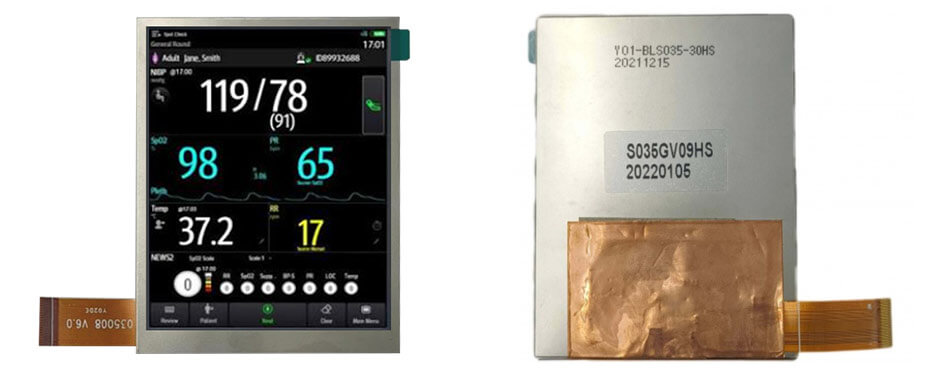
500 cd/m² and -20 to +70 °C cover indoor ward use comfortably. If the device travels outdoors or sits near a window, the viewing angle figures are where this module shows its limits, and a high-brightness IPS alternative is the better conversation.
Product page: 0.6 inch PMOLED Display 64×64 SPI
This one is a status window, not a parameter display. 64×64 pixels is enough for a mode indicator, a battery icon, a pump state or a short numeric reading, and PMOLED draws almost nothing when most pixels are off.
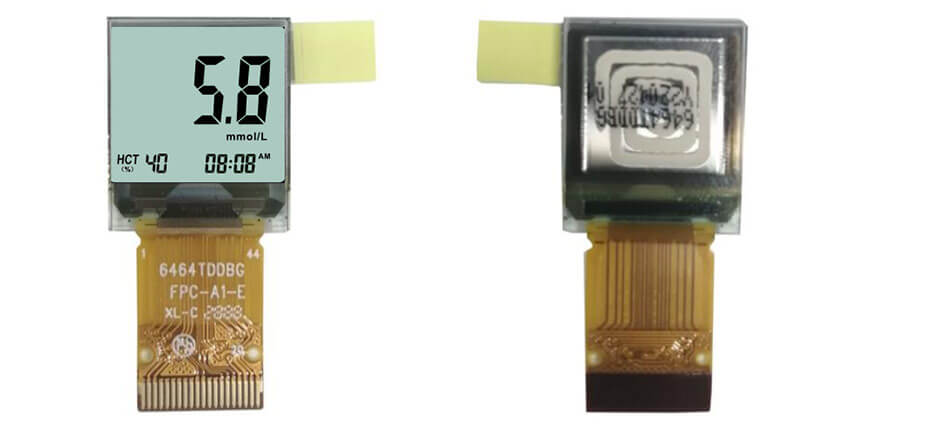
The -40 °C lower limit and near-symmetric viewing angle are wider than most TFT modules at this size, which is what makes it usable on a device that gets stored in a vehicle or handled at arm's length.
If your program needs something between these two — a 7-inch waveform display, a 12.1-inch bedside panel — our TFT LCD module range covers the middle, and the same selection logic applies.
Most selection cycles stall on missing information rather than on price. Nine items on one page usually makes the first round of quotations usable instead of exploratory.
Add a drawing or the part number you are replacing if there is one. "Same as the old module but brighter and with a longer FPC" is a workable brief; "a 7-inch screen" is not.
Then test with your own interface before design freeze. Numeral readability, waveform rendering, alarm visibility and behaviour under ward lighting cannot be judged from a datasheet, and they are also the four things hardest to change after tooling.
Standard modules cover a large share of patient monitors. Custom work usually starts where the enclosure, the interface or the brightness target stops fitting an off-the-shelf part — a taller FPC exit, a bonded cover lens, an anti-glare treatment, a temperature range the catalogue part does not reach.
Requirements we handle regularly:
One piece of advice from doing this for a while: confirm the layout and the board interface before tooling anything. Changing a pinout after the housing is cut is the most common avoidable cost in these projects.
If you are also working on the imaging side of a device, our guides to medical imaging displays and to healthcare displays in general cover the requirements that sit outside patient monitoring.
Working on a patient monitor or vital signs device? Send your display specifications through our contact page and we will come back with module options and customization notes.
TFT LCD, in the great majority of cases. It comes in the sizes these devices need, supports TTL, LVDS and MIPI, and is available for years after design freeze. Small OLED modules appear in compact instruments and secondary status displays.
There is no standard answer. Transport monitors tend to sit at 8 to 12.1 inches, bedside monitors at 10 to 19 inches depending on how many waveforms are shown, and handheld devices between 2.4 and 5 inches. Work from the layout and viewing distance, then pick a size that fits the enclosure.
No. Many monitors are operated with physical buttons, a rotary knob or a combination. Touch is common where menus are deep and settings change often; hardware controls still win where staff wear gloves or the device is used with wet hands.
Roughly 500 cd/m² for indoor ward and ICU use is workable. Units that sit near windows, or transport monitors used outdoors, generally need 800 to 1000 cd/m² with an anti-glare treatment. Higher brightness costs power and shortens backlight life, so it should follow the use case rather than lead it.
Yes, provided it meets the project's technical requirements. What a module cannot do is establish compliance on its own: the finished monitor is evaluated as a complete medical device, and display-related requirements are assessed at system level. We supply modules and their specifications; device validation stays with the equipment manufacturer.
Yes. Size, resolution, interface, brightness, touch integration, cover lens, FPC layout and temperature range can all be adjusted. Standard and semi-custom options usually shorten the schedule, so it is worth checking those first.


