Writer: Nilsson AndersRelease Time: 2026-11-26 08:29Browse: 29
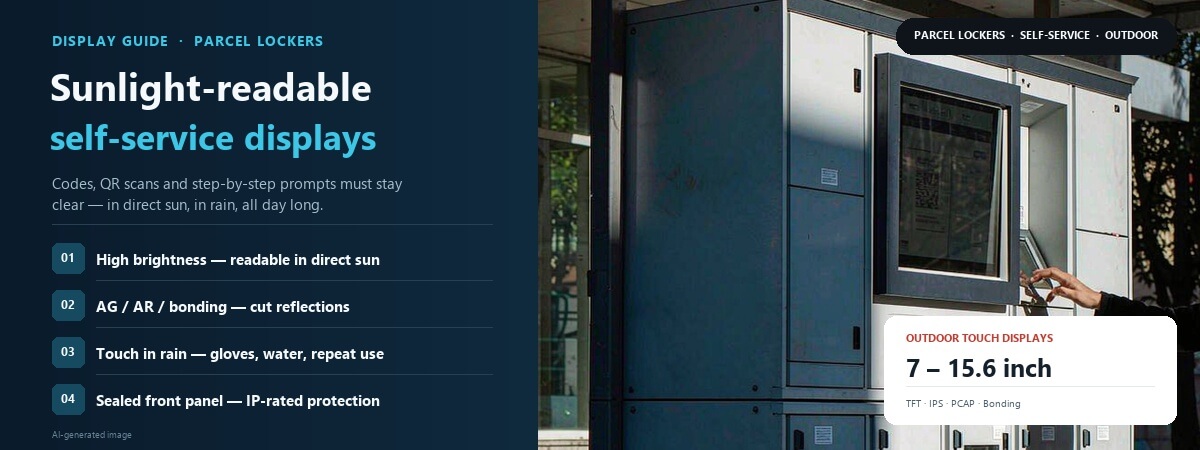
A resident collects a package in an open parking lot at noon; a courier drops off a return at a locker under a building canopy; a maintenance engineer clears a fault code on a terminal exposed to wind and rain. Three moments, one interface — if the screen washes out in sunlight or stops responding to touch, the whole self-service experience breaks down.
Outdoor parcel lockers are used in residential communities, office buildings, shopping centers and transport hubs, often running all day in changing weather. Their displays guide collection, show verification codes and instructions, and communicate system status. Unlike indoor terminals, they must handle strong sunlight, temperature changes, rain, dust and frequent interaction. Choosing the right sunlight-readable touch display therefore means looking beyond brightness alone. This guide works through the factors that matter — optical treatment, touch technology, environmental protection, interface compatibility and long-term operation.
Contents
Outdoor parcel lockers typically use an integrated display and touchscreen as the main user interface. It has to stay readable and responsive while users complete different operations.
Typical functions include:
The screen is used by people of different ages and technical backgrounds, so instructions should be easy to understand and important information should stay visible under different lighting. The installation environment matters too — a locker under an entrance canopy has different brightness needs from one in an open parking area in direct sun. Define the location, daily operating hours, interaction frequency and environmental conditions before choosing a display.
A standard indoor LCD may look clear in a factory but become hard to read in direct sunlight — especially when users need to scan QR codes, enter pickup codes or follow on-screen steps.
There is no single value for every outdoor locker. Evaluate brightness against ambient light, installation angle, cover glass and enclosure design. More brightness helps visibility but raises backlight power and heat, so balance the specification against the cabinet's power supply and thermal design.
For lockers running continuously, holding maximum brightness all day is rarely necessary. Automatic brightness adjustment lets the system increase output during the day and reduce it at night or in shade — improving visibility while cutting unnecessary power consumption and backlight stress.
Brightness is only part of the equation. Reflected light can make screen content hard to recognize, especially on a front-facing display at a fixed angle where sun reflects off the cover glass.
AG changes the cover glass surface to diffuse reflected light, reducing distracting reflections. The degree of diffusion can affect image sharpness, so select the finish by screen size, viewing distance and interface content.
AR reduces the amount of light reflected from the surface and improves perceived contrast in bright environments — useful when the screen must show small text, QR codes or detailed information.
Optical bonding fills the gap between display and cover glass with a transparent material. It can reduce internal reflections, improve perceived contrast and limit dust or moisture accumulating in the gap. For outdoor lockers, evaluate it together with cover glass thickness, touch sensor design, sealing and repair considerations.
Touch is the primary input method for most self-service lockers. It must respond accurately to repeated use and stay usable in changing weather.
PCAP is widely used in modern self-service terminals. Its advantages include a smooth glass front, multi-touch support, good optical performance when properly designed, compatibility with modern graphical interfaces, and flexible cover glass and sensor configurations. It suits lockers using QR prompts, virtual keyboards and step-by-step instructions. Performance still depends on sensor, controller, cover thickness, grounding and electrical noise — all of which belong in system integration.
Resistive screens detect pressure and can be useful where users wear gloves or use a stylus. Their optical characteristics and interaction behavior differ from PCAP. Compare touch accuracy, clarity, durability and expected conditions before deciding.
A touchscreen that works in the lab may behave differently once installed outdoors. Test bare-finger operation, common gloves, water droplets and surface moisture, repeated touches, electrical noise from nearby equipment, and response through the selected cover glass. For public-facing equipment, reliable touch matters even more because users may not know the system.
Outdoor lockers face rain, dust, humidity and other environmental factors. The display opening is a critical mechanical area — water can enter through gaps between cover glass, mounting frame and enclosure if the front panel is not properly sealed.
Design considerations include sealing around the display opening, cover glass and bezel construction, protection of connectors and cables, moisture resistance of the assembled front panel, drainage and water management around the enclosure, and resistance to dust accumulation.
IP ratings describe enclosure protection against solid objects and water under specified test conditions. A standard LCD module or touchscreen should not automatically be called waterproof or dustproof — protection depends on the complete enclosure and assembly. Define the required IP rating for the equipment and validate the final assembly through appropriate testing.
Outdoor lockers can see significant temperature changes across the year. Winter cold affects LCD response; summer sun and internal cabinet heat raise the temperature around the display.
At low temperatures, some LCD modules show slower response and more noticeable image transitions. This affects pickup codes and verification information, QR codes and scanning instructions, virtual keyboard input, animated prompts and real-time locker status. Consider a wide-temperature module when the equipment operates in cold outdoor environments.
Heat affects the LCD panel, backlight, driver IC and other electronics. Internal locker temperature can exceed ambient air, especially in direct sun with limited ventilation. Evaluate the display's maximum operating temperature alongside the cabinet's thermal management. The specified range should cover actual conditions at the display position, not just local outdoor air temperature.
Size should match the locker's functions and expected viewing distance. A compact display may suffice for simple pickup; a larger touchscreen suits systems adding sending, payment, returns and other services.
Smaller TFT modules work for simpler interfaces — pickup codes, locker status, short instructions, basic icons and confirmation messages. Text and touch targets must be large enough for comfortable operation.
Larger screens allow more space for collection and delivery, payment, identity verification, multiple language interfaces, advertising or service information, and administrative functions. Choose resolution by size and interface needs — more pixels are not automatically better if text and buttons become too small.
The display must work with the locker's mainboard, processor and touch controller.
| Interface | Typical Application |
|---|---|
| RGB | TFT modules connected to compatible display controllers |
| MIPI DSI | Embedded systems requiring compact high-speed connections |
| LVDS | Industrial control systems with compatible display outputs |
| SPI | Small displays with relatively simple graphical interfaces |
| HDMI | Systems using a compatible HDMI controller or driver board |
The right interface depends on the mainboard's output capability and the module's electrical specifications. An RGB, MIPI or LVDS module normally cannot connect directly to an HDMI output without a controller or conversion board. Before finalizing, confirm mainboard output, supported resolution and refresh rate, signal voltage and timing, connector type and pinout, driver IC compatibility, touch controller interface, and cable length and position. Early confirmation avoids PCB changes and integration delays.
Outdoor lockers sit in public areas and may stay operational for long periods, with displays active throughout the day or continuously available for interaction.
A display held at high brightness all day ages differently from one using automatic adjustment. Review backlight lifetime against the manufacturer's stated test conditions — it is not a guaranteed service life for the whole locker.
Selecting on brightness alone. A bright display can still be hard to read if the cover glass reflects strongly. Consider optical treatment and installation angle together.
Ignoring water-related touch issues. Rain and droplets can affect PCAP performance depending on sensor and controller. Test in conditions representative of actual use.
Using an indoor-grade display outdoors. A standard indoor LCD may not meet the temperature, brightness or environmental requirements of an outdoor locker.
Assuming the LCD module has an IP rating. Protection comes from the complete front panel and enclosure. The finished product must be evaluated against its required rating.
Choosing the interface too late. Confirm interface, pinout and driver compatibility before the mainboard design is finalized.
Overlooking interface readability. Small text, crowded buttons and complicated instructions make a locker hard to use even when the hardware performs well.
Defining these requirements before selecting the display reduces integration problems and improves the reliability of outdoor self-service equipment.
Youritech provides industrial LCD and touchscreen display solutions for manufacturers developing outdoor parcel lockers, self-service terminals, access-control systems and other industrial equipment.
Different locker designs need different configurations. A compact pickup terminal may need a small touchscreen with clear instructions; a larger self-service cabinet may need a high-brightness display with a richer graphical interface. Configurations can be evaluated and customized around:
Youritech can work with equipment manufacturers to evaluate display specifications and integration requirements during product development. If you are developing an outdoor parcel locker or self-service logistics terminal, contact Youritech to discuss a suitable display solution.
Request a Quote / Get a Custom Display Solution
A high-brightness TFT LCD with a suitable touchscreen is commonly considered. Final selection depends on sunlight exposure, screen size, temperature range, touch requirements and mainboard compatibility.
It depends on whether the locker sits in direct sun, partial shade or a sheltered location. Direct-sun installations generally need higher brightness and reflection control. Test the complete assembly under representative lighting.
Yes. PCAP is widely used in modern self-service equipment. Outdoor operation requires attention to water droplets, gloves, cover glass thickness, grounding and electrical noise.
Depends on sensor design and controller. Some PCAP systems support water-resistant operation, but this must be verified for the complete assembly. The front panel must also be sealed against water ingress.
Outdoor lockers may see low winter temperatures and high internal temperatures in summer. Both affect LCD response and components. A wide-temperature display helps cover expected conditions when selected for the actual installation environment.
It can reduce internal reflections between LCD and cover glass, improving perceived contrast in bright environments. Effectiveness depends on the optical design and surrounding surface treatments.
Configurations can be evaluated for screen size, resolution, brightness, operating temperature, touchscreen type, cover glass, interface and mechanical dimensions. Manufacturers can provide equipment specifications to discuss a suitable configuration.
Outdoor parcel locker displays must stay readable in direct sun, responsive in rain and stable across temperature extremes — all while guiding users through everyday tasks. Treat the screen as part of the complete front-panel system: brightness, optics, touch, sealing and interface decisions together. Define the installation environment early and the display becomes a reliable interface instead of a source of service calls.
Youritech — Industrial LCD and Touch Display Solutions for Embedded Applications.


