Writer: Nilsson AndersRelease Time: 2026-11-26 08:16Browse: 35
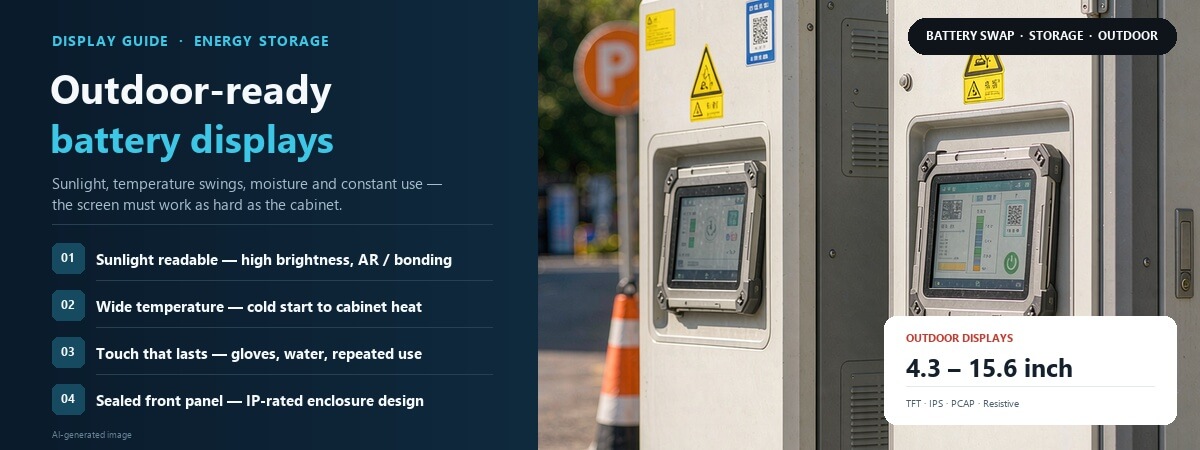
A rider swaps a battery at a curbside cabinet in bright afternoon sun; a technician reads state-of-charge and fault information on an outdoor energy storage panel; an operator follows a replacement prompt on a self-service terminal. Three different interfaces, one common demand — the screen has to stay clear and responsive outdoors, day after day.
Battery swap cabinets and outdoor energy storage systems are becoming common in electric mobility, commercial energy management and distributed power. Their displays carry status, instructions, battery data and warnings, but unlike indoor equipment they face sunlight, temperature swings, moisture, dust and continuous operation. Choosing a screen means looking beyond size and resolution to the installation environment, user interface, electrical compatibility and long-term reliability of the complete assembly. For the fixed control-room side of the same decision, see the guide to HMI displays in automation.
Contents
The two cabinet types serve different purposes, but both rely on displays to communicate system information and support operation.
Used in electric two-wheelers, three-wheelers and other swapping applications, with screens on the front panel or user-accessible control area. Typical functions include battery availability and charging status, operating instructions, user prompts during replacement, error and maintenance messages, payment or access-control interfaces, and network status. Because users interact outdoors, the screen must stay readable in changing light and the touchscreen must respond consistently to repeated use.
Used in commercial and industrial storage systems, renewable installations and distributed power. Displays may show state of charge (SOC), state of health (SOH), charge and discharge status, voltage, current and temperature, alarms and faults, operating modes and configuration, and communication and power status. Some cabinets use a local display for technicians; others provide an operator interface. Size and interaction method follow the equipment architecture and intended users.
Outdoor energy cabinets and swap stations are often exposed to direct sunlight. A display that looks fine indoors can become hard to read when sun hits its surface.
Standard indoor displays may not be bright enough outdoors, so higher-brightness TFT modules are often considered. Appropriate brightness depends on whether the screen sits in direct sun or under a canopy, its angle to incoming light, the presence of a protective cover or touchscreen, surface reflectivity and the amount of information shown. More backlight improves visibility but also raises power consumption and heat, so the display belongs in the cabinet's overall thermal and power design. The same trade-offs are covered in the high-brightness display guide.
Brightness alone does not guarantee readability — reflections reduce contrast. Depending on the application, consider anti-glare surface treatment, anti-reflective coatings, optical bonding between display and cover glass, and suitable cover glass thickness and finish. Optical bonding reduces internal reflections and improves perceived contrast, but it also affects mechanical structure, repairability and manufacturing, so evaluate it at the design stage.
Outdoor cabinets may face cold winters, hot summers and large day-to-night swings. Internal temperatures can also rise from battery operation, power electronics and limited ventilation.
Conventional LCD performance changes as temperatures fall: slower pixel response, image smearing during transitions, reduced uniformity, shifts in contrast and viewing performance, and longer stabilization after startup. These effects are noticeable when battery information or instructions must update quickly. For cold installations, consider a wide-temperature LCD, and check that the specified range covers the actual conditions at the display location — not just outdoor ambient temperature.
Heat affects the panel, backlight, polarizer, driver IC and other electronics. Inside an energy cabinet, internal temperature may exceed outside air because of batteries, inverters and charging equipment. Check maximum internal temperature, the display's operating specification, backlight heat generation, ventilation and heat dissipation, and the temperature distribution near the mounting position. A wide-temperature rating helps, but the assembled system still needs thermal evaluation in realistic conditions.
Touch is common in swap cabinets and some outdoor storage systems. The right technology depends on how users operate the equipment and where it is installed.
PCAP supports multi-touch and a smooth front surface suited to graphical interfaces — swap user terminals, self-service panels, storage control interfaces and configuration screens. For outdoor use, evaluate performance with the selected cover glass and surface treatment. Water droplets, gloves, electrical noise and grounding can affect touch behavior depending on the controller and system design.
Resistive screens detect pressure and can suit interfaces operated with gloves or a stylus. Their optical and mechanical characteristics differ from PCAP, so evaluate suitability against required visibility, durability and user experience.
Glass thickness and strength, surface hardness and scratch resistance, anti-glare or anti-reflective treatment, bezel and mounting structure, and sealing between glass and enclosure all matter. Test the complete front-panel assembly for the intended environment — a touchscreen or cover glass alone does not establish the cabinet's protection rating.
Cabinets may face rain, humidity, dust and airborne contaminants. A display behind an outdoor panel gets some enclosure protection, but moisture can still enter through gaps, cable openings or poor mounting.
Design considerations include sealing around the display opening, protection of FPC and electrical connections, suitable connectors and cable routing, resistance to condensation, protection against dust entering the assembly, and corrosion resistance of exposed metal parts.
Ingress Protection (IP) ratings describe enclosure protection against solid objects and water under specified test conditions. Distinguish the rating of an LCD module from that of the complete equipment enclosure — a standard module should not be called waterproof or dustproof. For outdoor cabinets, front-panel structure, cover glass, sealing materials, mounting method and cable interfaces all contribute to final protection. Evaluate the finished assembly against the target environment.
Size follows the amount of information and the distance from which users need to read it.
Compact TFT modules suit swap cabinets showing instructions, battery availability and simple status. Design for readable text and icons, clear battery indicators, simple operation steps, easy-to-recognize warnings and adequate touch target size.
Larger screens suit storage cabinets with richer monitoring and configuration: multiple battery parameters, real-time operating information, trend charts and data visualization, alarm lists and maintenance instructions, and system menus. Choose resolution by screen size, viewing distance and interface complexity — higher resolution is not always necessary for large icons and simple text. Prioritize important information so battery status, warnings and faults are identifiable without navigating multiple screens.
Interface compatibility is a critical part of hardware integration. Cabinets use different mainboard architectures depending on control platform, processing needs and communication design.
| Interface | Typical Application |
|---|---|
| RGB | Direct connection to compatible display controllers |
| MIPI DSI | Embedded systems needing a compact high-speed display interface |
| LVDS | Industrial systems using compatible controller hardware |
| SPI | Small displays with relatively simple interface requirements |
| HDMI | Systems using a compatible HDMI controller or driver board |
Select by the mainboard's actual output capability and the module's electrical requirements. An RGB, MIPI or LVDS module normally cannot connect directly to an HDMI output without a compatible controller or conversion solution. Before selecting, confirm mainboard display output, resolution and supported refresh rate, signal voltage and timing, connector type and pin assignment, driver IC compatibility, touch controller interface, and cable length and routing. Early confirmation reduces prototype integration problems.
Many outdoor cabinets run continuously or stay in standby for long periods. Displays may stay active all day or wake when a user approaches.
Backlight power is a major part of a TFT's draw, and higher brightness means more power, so balance the specification against the cabinet's budget. In swap cabinets the display may activate mainly during interaction — automatic brightness control, screen timeout and standby functions can cut unnecessary consumption. In storage monitoring panels the screen may need to stay visible for long periods, so backlight lifetime, thermal conditions and continuous-operation requirements belong in component selection.
Once installed, a display is not an independent component. Its reliability depends on how the LCD, cover glass, mounting frame, cables, connectors and enclosure interact.
Mount securely without excessive pressure on the panel — poor mounting can cause uneven pressure, light leakage, mechanical stress or assembly damage. For equipment in public areas, the front panel should withstand the expected level of repeated user interaction. Test the complete assembly under representative environmental and mechanical conditions rather than relying on individual component specifications.
Choosing brightness from indoor testing alone. A screen that looks clear in the factory may fail in direct sun. Evaluate it in conditions representative of the actual installation.
Ignoring internal cabinet temperature. Inside temperature can differ sharply from outdoor ambient. Check the display's position and expected thermal conditions.
Assuming an IP rating applies to the LCD module. Protection usually comes from the complete enclosure and installation structure. Confirm the finished assembly's requirements.
Selecting a touchscreen without considering gloves and moisture. Test with the intended cover glass, gloves and environmental conditions.
Confirming the interface too late. Connector, pinout, signal timing and driver compatibility should be checked before the mainboard design is finalized.
Focusing only on size and resolution. Brightness, operating temperature, power consumption, mechanical dimensions and long-term availability matter just as much in industrial equipment.
Defining these requirements early helps manufacturers avoid unnecessary redesigns and pick a display that fits the complete equipment architecture.
Youritech provides industrial LCD and touchscreen display solutions for manufacturers developing battery swap cabinets, outdoor energy storage systems and other industrial control products.
A compact swap terminal may need a small TFT with a responsive touchscreen; an outdoor storage cabinet may need a larger, brighter display with a wider temperature range. Depending on project requirements, solutions can be evaluated and customized around:
Selecting a suitable display early improves hardware compatibility and reduces integration work. If you are developing a battery swap cabinet or outdoor energy storage system, contact Youritech to discuss display specifications and project requirements.
Request a Quote / Get a Custom Display Solution
A TFT LCD with suitable brightness and touchscreen functionality is commonly considered. Final selection depends on screen size, outdoor visibility, operating temperature, user interaction and mainboard compatibility.
It depends on sunlight exposure, installation angle, cover glass and reflection control. Displays in direct sun generally need more brightness than those under a canopy. Evaluate the complete front-panel assembly in its intended environment.
Outdoor cabinets may see low winter temperatures and high internal temperatures during operation. LCD response and other characteristics change with temperature, so a suitable wide-temperature module helps the display operate within the equipment's specified environmental range.
Some PCAP systems support glove operation, but performance depends on the touch controller, sensor design, cover glass and glove material. Test the complete assembly with the gloves expected in actual use.
No. A standard module should not be considered waterproof. Water and dust protection depends on the enclosure, front-panel sealing, connectors and overall mechanical design of the finished equipment.
RGB, MIPI DSI, LVDS and SPI are possible, depending on size, resolution and mainboard architecture. HDMI may also be used with a compatible controller or driver board. Confirm the choice during hardware design.
Yes. Manufacturers can evaluate size, resolution, brightness, operating temperature, touchscreen type, cover glass, interface and mechanical dimensions. Customization should be based on the equipment's electrical, mechanical and environmental requirements.
Battery swap and outdoor energy storage displays have to stay readable in sun, stable across temperature extremes, responsive to gloved or repeated use, and protected inside a sealed cabinet. Treat the screen as part of the complete assembly — optical, thermal, mechanical and electrical decisions together — and involve the display supplier early. Define those requirements up front and integration becomes a predictable step rather than a late redesign.
Youritech — Industrial LCD and Touch Display Solutions for Embedded Applications.


