Writer: Nilsson AndersRelease Time: 2026-11-26 03:05Browse: 36
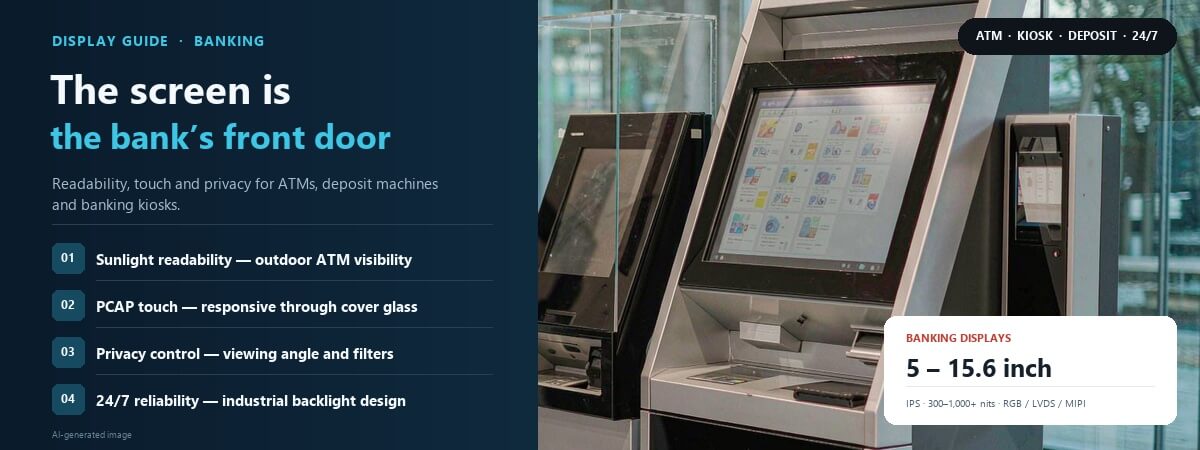
A customer withdraws cash at a branch ATM; a self-service kiosk prints a statement in a busy lobby; a deposit machine reads a stack of banknotes at a drive-through. Three different screens, one product category — and the display that works for one will fail for another.
This guide splits banking equipment into the three families that matter for display selection — ATMs, banking self-service terminals and cash deposit / payment terminals — and works through what each actually demands: sunlight readability, touch through a cover lens, privacy against side viewing, and the interface decision that ties the module to the mainboard. For the fixed-installation counterpart of the same decision process, see the guide to HMI displays in automation.
Contents
Where the machine sits and how customers use it decide the display spec — before any datasheet is opened.
Installed in bank branches, shopping centers, transportation hubs, convenience stores and outdoor locations. The screen guides customers through transaction menus, account information, withdrawal and deposit instructions, balance inquiries, fund transfers, PIN entry guidance, security notifications, confirmations, error messages and language selection. It must stay readable under changing lighting and remain straightforward for users of all technical levels. Outdoor ATMs push sunlight readability, reflections and operating temperature up the priority list; indoor machines focus more on viewing comfort, touch interaction and enclosure integration.
These provide more functions than traditional ATMs: account services, document printing, customer information updates, appointment management and other operations. Larger touchscreens accommodate detailed menus and interactive forms. Common applications include account information terminals, statement printing machines, information update kiosks, queue and appointment terminals, digital banking kiosks and self-service document equipment. Screen size, resolution and touch responsiveness directly influence how easily customers finish the task.
These require clear transaction guidance from start to finish: banknote recognition results, deposit amounts, transaction progress, payment confirmation and error notifications. A stable display interface helps customers understand each step and reduces confusion during financial transactions.
Size follows from what the screen is asked to do: a status readout can stay small; anything with detailed menus, virtual keypads or interactive forms needs real estate. Common design practice:
| Size Range | Typical Application | Typical Display Functions |
|---|---|---|
| 5–7 inch | Compact banking terminals, auxiliary interfaces | Status, simple menus, prompts |
| 8–10.1 inch | Standard ATM interfaces, medium self-service devices | Transaction menus, account information, touch controls |
| 12.1–15.6 inch | Larger banking kiosks | Detailed forms, multi-section interfaces, guided workflows |
These are general design references, not fixed industry standards — the final size must match the enclosure, viewing distance and UI layout. Resolution should serve the interface, not chase a number: higher resolution improves text definition, icons and graphics, and matters most when displaying detailed forms or multiple information sections. Then design the UI for the real viewing distance: text size, icon dimensions, touch-target spacing and scaling.
A display that works well inside a branch can become unreadable in direct sunlight. Reference considerations:
| Condition | What to Evaluate |
|---|---|
| Indoor branch / mall | Viewing comfort, moderate brightness, even backlight |
| Semi-outdoor vestibule | Bright ambient light, cover glass transmission, glare control |
| Outdoor ATM / kiosk | Sunlight readability, anti-reflective treatment, optical bonding, thermal behavior |
Check indoor or outdoor installation, direct sun exposure, cover glass transmission, surface reflection and glare, automatic or manual brightness adjustment, and expected operating temperature. High-brightness TFT LCD modules improve visibility in lit locations, but brightness alone does not determine readability: optical bonding, anti-reflective surface treatments and enclosure design also shape the final viewing experience. Evaluate outdoor display selection under realistic lighting, not just laboratory brightness figures; the same trade-offs are covered in the high-brightness display guide.
Banking terminals are used by customers of different heights, standing or seated. Wide viewing angles keep the image consistent from different positions, and IPS TFT LCD is a practical choice for many self-service terminals because of stable color and wide viewing cones.
ATMs, however, present personal financial information. A wide viewing angle can increase the chance that someone nearby reads a balance or PIN entry. Balance viewing comfort against privacy: a privacy filter or a more controlled viewing angle may be appropriate. When selecting a privacy solution, evaluate its impact on front-facing brightness, image clarity, color appearance, touch responsiveness and viewing comfort — it should not make the screen difficult for the intended user to read.
Touch lets customers navigate menus, select services and enter information directly on the display. Two common technologies:
| Comparison | Capacitive (PCAP) | Resistive |
|---|---|---|
| Input method | Finger, responsive multi-touch | Pressure from finger, stylus or other object |
| Front surface | Smooth glass, clear optical appearance | Flexible film layer |
| Cover glass | Supports customized lens designs | Depends on stack configuration |
| Application focus | Modern interactive banking interfaces | Specific input methods or operating conditions |
See the touch screen product line for integration-ready examples. The choice should follow the user interface, cover lens design, operating conditions and compatibility with the mainboard — not habit. Touch sensitivity must also be verified through the final cover glass, not on a bare panel.
ATMs and self-service terminals serve a wide range of customers, so readability, screen positioning and clear visual feedback all contribute to an accessible experience. The US ADA Standards for Accessible Design, Section 707, specify requirements for ATM display visibility and character presentation: the screen must be visible from a defined reference position, and displayed characters must use a sans-serif font with sufficient height and contrast. For applicable ATM designs, the standard specifies a minimum character height of 3/16 inch (4.8 mm), measured using the uppercase letter "I" — see the US Access Board – ADA Standards.
From a display selection perspective, consider adequate text size and contrast, consistent brightness, clear transaction instructions, suitable screen positioning for different users, compatibility with accessible touch and audio functions, and enough display area for readable menus and controls. Accessibility is not determined by the LCD module alone: screen mounting, interface software, physical keypads, audio output and overall machine design must work together to meet applicable requirements.
Outdoor ATMs see temperature swings through the year — high heat in summer, low temperatures in winter. Check specified operating and storage ranges; industrial TFT LCD modules with extended temperature options may be more appropriate than consumer-grade panels. Evaluate the complete device for thermal management, backlight performance and heat accumulation inside the enclosure. Wide-temperature display options cover demanding installations.
Outdoor and semi-outdoor terminals meet dust, moisture and changing weather. The LCD module itself is not necessarily waterproof or dustproof: protection comes from the complete enclosure, cover glass, sealing structure and assembly process. Define the required IP level of the finished equipment and verify it through product testing.
Banking equipment is used by many customers every day. Repeated touch, accidental impacts and vibration affect the structure over time. Match the display assembly to the enclosure's mounting design, and verify cover glass strength, module fixation, connector retention and cable routing during development.
The display must work with the machine's mainboard, processor and display controller:
| Interface | Typical Application |
|---|---|
| RGB | Embedded display systems and compact banking terminals |
| LVDS | Industrial and larger-format display applications |
| MIPI DSI | Compact devices and integrated touch terminals |
| SPI | Smaller displays with relatively simple graphical interfaces |
| HDMI | Development platforms and systems using standard video output |
Select by mainboard design, required resolution, refresh rate and signal transmission. Then confirm connector type and pin assignment, operating voltage and power consumption, display timing parameters, driver IC compatibility, touch controller compatibility, and firmware and software support. Checking these before hardware development reduces compatibility issues in prototyping and mass production.
ATMs and banking self-service terminals often operate for long periods, sometimes around the clock. The display contributes to overall power consumption, particularly when high-brightness backlighting is required. Review backlight power consumption, operating brightness, power supply requirements, thermal management, expected operating hours and backlight lifetime specifications. For continuously powered devices, stable backlight performance and proper thermal design keep the image consistent over time; evaluate the rated backlight lifetime under actual brightness and temperature conditions.
| Selection Item | Key Considerations |
|---|---|
| Application | ATM, cash deposit machine, banking kiosk or payment terminal? |
| Screen size | Available installation space and viewing distance? |
| Resolution | Required text clarity and interface complexity? |
| Brightness | Indoor, semi-outdoor or outdoor installation? |
| Viewing angle | User position and privacy requirements? |
| Touch technology | Capacitive or resistive? |
| Cover glass | Thickness, shape, anti-glare and anti-fingerprint needs? |
| Interface | RGB, LVDS, MIPI, SPI or HDMI — mainboard compatible? |
| Temperature | Actual environmental conditions expected? |
| Mechanical | Module dimensions, mounting and connector position? |
| Reliability | Backlight lifetime and expected operating hours? |
There is no single display configuration suitable for every banking machine. The best solution matches the actual operating environment, user interaction requirements and hardware platform. Answering these before the prototype build is cheap; answering them after the enclosure is tooled is not.
Standard modules rarely land exactly on a banking device's enclosure, interface and lighting constraints. Youritech provides industrial LCD and touch display solutions for banking equipment, self-service terminals and embedded control systems — see the custom LCD and OLED service and solutions by application.
Supported configurations include:
A compact transaction terminal may prioritize integration space and power consumption; an outdoor ATM may require higher brightness, improved optical performance and a wider operating temperature range. Evaluate the display together with the mainboard, enclosure and operating environment. If you are developing an ATM, cash deposit machine, banking kiosk or other financial self-service equipment, contact Youritech to discuss your requirements.
Request a Quote / Get a Custom Display Solution
Sizes vary with equipment design and functionality. Compact models may use smaller modules; modern interactive ATMs often need larger screens for transaction menus and touch controls. The final size should match the enclosure and user interface requirements.
IPS TFT LCD is a practical option for many terminals because of wide viewing angles and stable image presentation. High-brightness TFT LCD modules suit machines in brightly lit or outdoor environments.
Capacitive touch is common in modern interfaces requiring responsive interaction and a smooth front surface; resistive may suit specific applications requiring pressure-based input. The choice depends on machine design and operating conditions.
Yes — sufficient brightness is needed to stay readable in strong ambient light. Anti-reflective treatments, optical bonding and enclosure design should also be considered, because brightness alone does not eliminate reflections.
Privacy filters or controlled viewing-angle solutions reduce visibility from side positions. Evaluate them carefully so the intended user can still read transaction information comfortably.
Yes. Dimensions, resolution, brightness, touch functionality, cover glass shape, connector position and interface configuration can all be customized, subject to technical feasibility and mainboard compatibility.
Yes — provided backlight lifetime, operating temperature, power requirements and thermal conditions meet the equipment's specifications.
Banking display selection is a balance of readability, touch behavior, privacy, environmental durability and hardware fit. ATMs live or die by sunlight readability and privacy; self-service kiosks by screen area and touch responsiveness; deposit terminals by clear transaction guidance. Define the machine's environment and interface requirements early, and the display becomes an asset instead of a warranty claim.
Youritech – Industrial LCD and Touch Display Solutions for Embedded Applications.


