Writer: Nilsson AndersRelease Time: 2026-11-27 06:35Browse: 28
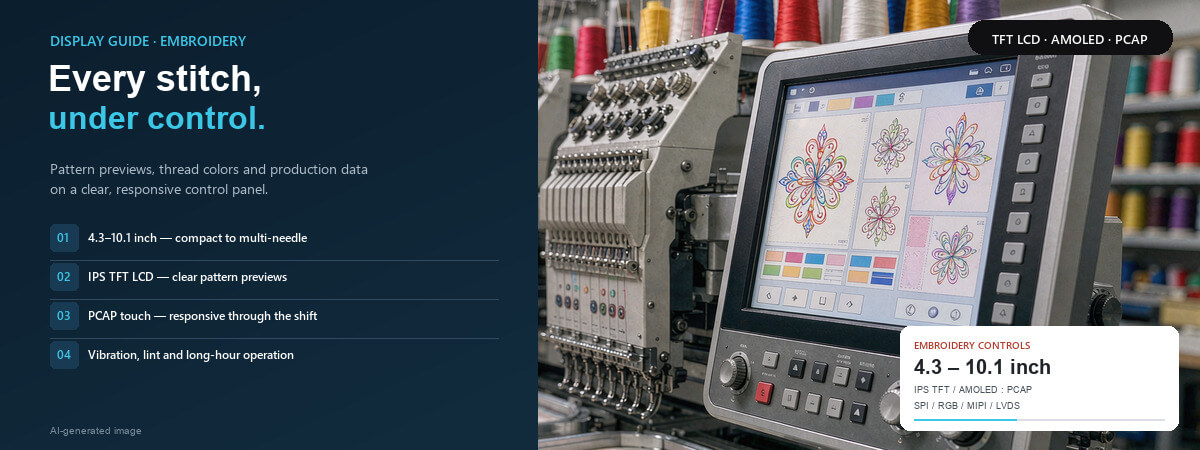
An operator selects a pattern on a garment factory machine, switches thread colors on a multi-needle head, and checks the remaining stitch count before the next batch. The screen in front of them is the main interface to the machine — and it has to stay clear and responsive through a full production shift.
Unlike a consumer touchscreen, an embroidery machine display works as part of an industrial control system: it shows pattern previews, stitch settings and production data, accepts frequent touch input, and operates around vibration, lint, dust and long hours. This guide works through what actually matters — display size and format, TFT LCD or AMOLED, touch performance, brightness and viewing angles, environmental protection, interfaces and customization. For the wider control-panel context, see the guide to HMI displays in automation.
Contents
The control panel is the main interface between the operator and the machine. Its layout and display quality influence how easily jobs are configured and production is monitored. Depending on the machine model, the screen may present:
These functions create different demands: pattern previews need sufficient resolution and color consistency, while control settings require clear text, responsive touch input and an intuitive interface.
Size follows the control panel layout, available installation space and how much information operators need at one time. Compact screens can suit machines with simple functions; larger displays help when the interface includes previews, multiple parameter pages and detailed production data.
| Display size | Typical use |
|---|---|
| 4.3–5.0 inch | Compact machines with basic pattern selection, speed adjustment and status monitoring; small installation footprint |
| 7.0 inch | More room for pattern previews, color sequences and operating controls; practical for advanced functions |
| 10.1 inch | Multi-needle and industrial machines with complex interfaces; organizes patterns, parameters and status without crowding |
The best size depends on viewing distance, button layout, user interface design and cabinet dimensions. A larger display is not automatically better if it makes the panel difficult to operate or integrate. Square displays suit icon-based control layouts, while wide formats give more horizontal space for previews and thread information.
TFT LCD is a practical choice for many industrial control applications, with a wide range of sizes, resolutions, brightness levels and interfaces. IPS TFT LCD is useful when operators view the panel from different angles — the wide viewing angles keep image appearance consistent when the screen is installed at an angle or beside the machine.
Other TFT LCD advantages include multiple standard size and resolution options, support for capacitive touch integration, high-brightness configurations, compatibility with different controller architectures, and flexible mechanical and FPC customization. For most embroidery interfaces, TFT LCD is a sensible starting point when balancing performance, integration and cost.
AMOLED uses self-emissive pixels for deep blacks and high contrast, and can be considered for premium machines where appearance leads the design. Account for operating temperature, brightness requirements, expected service life and content characteristics — static interface elements should be assessed for long-term image retention. For equipment built primarily for industrial production, TFT LCD is usually the more straightforward option; AMOLED is better evaluated project by project.
Operators use the panel repeatedly through a shift: selecting patterns, entering parameters, switching thread colors and confirming settings all depend on a usable touch interface. Projected capacitive (PCAP) touch is a common choice for modern embroidery machines, supporting multi-touch input and a smooth glass surface for responsive menu navigation and parameter adjustment — see the capacitive touch display range.
When selecting a PCAP touchscreen, consider:
Touch is not always the best answer for every machine. Some manufacturers prefer a combination of touch controls and physical buttons for frequently used functions. Review the cover lens options when defining the front panel.
Embroidery machines are normally installed indoors, but lighting varies significantly between workshops and factories. The display should stay readable under the actual ambient light without causing unnecessary eye strain.
Brightness selection should consider general workshop lighting, reflections from overhead lights, the distance between operator and screen, the angle of the control panel, and cover glass reflection and surface treatment. IPS displays help maintain image consistency from different positions — useful when the panel is mounted on the side of a machine or set at an angle.
For indoor embroidery equipment, extremely high brightness is not always necessary. Set the target from the installation environment, cover lens and optical design rather than picking the highest available specification. See the LCD brightness note and the high-brightness range for reference.
Embroidery machines contain motors, moving parts and mechanical assemblies. In operation the control panel can see continuous vibration and exposure to textile lint, dust and other workshop contaminants. These conditions belong in the display specification.
A display that works well on a test bench can behave differently once installed inside a machine enclosure — validate the assembly in its final mounting conditions.
The display interface must match the embroidery machine's mainboard and controller; it affects electrical design, cable routing and software integration.
The right interface depends on resolution, controller capabilities, available pins, cable design and system architecture — compare MIPI and LVDS options and the LCD controller board lineup. Before selecting a module, confirm display resolution and timing, mainboard output interface, driver IC compatibility, FPC pin count and connector position, power supply requirements, and touch controller interface and driver support. Checking these early reduces integration problems during prototyping.
Different embroidery machines put different loads on the display. Use the machine class to set the starting specification, then refine against the actual panel design.
| Machine type | Display starting point | Key reason |
|---|---|---|
| Compact / hobby machines | 4.3–5.0 inch TFT LCD | Basic pattern selection and status; small footprint |
| Mid-range workshop machines | 7.0 inch IPS TFT with PCAP | Previews, color sequences and frequent touch input |
| Multi-needle industrial machines | 10.1 inch IPS or custom format | Organizes complex interfaces without overcrowding |
| Premium design-led machines | AMOLED, project-dependent | High contrast and appearance, with lifetime checks |
This is a starting point rather than a fixed rule — the final choice depends on the user interface, installation structure and production environment.
Standard display modules may not always match the installation space or operating requirements of a particular embroidery machine. Customization can achieve a better fit between display and control panel:
Confirming the mechanical and electrical design early reduces redesign work and shortens development.
Before finalizing a display for an embroidery machine, review the following points:
| Selection item | What to check |
|---|---|
| Display size | Available panel space and viewing distance |
| Resolution | Pattern preview and interface detail |
| Display technology | TFT LCD, IPS or AMOLED |
| Touch type | PCAP or non-touch |
| Brightness | Actual workshop lighting |
| Viewing angle | Control panel installation position |
| Operating temperature | Temperature inside the enclosure |
| Vibration | Mounting structure and cable connection |
| Interface | SPI, RGB, MIPI DSI or LVDS |
| Cover glass | Thickness, printing and surface treatment |
| Mechanical design | Outline dimensions, FPC and connector position |
Reviewing these factors before purchasing display modules helps reduce redesign work and improve integration.
A control panel display for a computerized embroidery machine must do more than show images and operating data. It should make pattern selection straightforward, keep production information readable and integrate reliably with the machine's electronic and mechanical systems. Compact embroidery equipment may be well served by a smaller TFT LCD; more advanced machines benefit from a larger IPS touchscreen with room for pattern previews, thread information and production controls.
The right solution depends on the machine's operating environment, user interface, mainboard and installation structure. Youritech provides industrial display solutions for equipment manufacturers — TFT LCD modules, touch integration, cover lens customization and display interface matching — supporting designs from compact pattern-setting screens to larger interfaces for multi-needle industrial machines. See custom LCD and OLED solutions or contact the team to discuss display size, resolution, touch integration, interface and mechanical requirements for your next embroidery machine project.
Pattern previews with stitch paths and orientation, stitch counts and speed settings, thread color sequences and needle assignments, production progress and machine status, operating modes, and warnings such as thread breakage or faults. Previews need resolution and color consistency; settings need clear text and responsive touch.
4.3–5.0 inch for compact machines with basic controls, 7.0 inch for previews and color sequences, and 10.1 inch for multi-needle or industrial machines with complex interfaces. Size follows viewing distance, button layout, UI design and cabinet dimensions — a larger screen is not automatically better.
TFT LCD is the practical starting point for industrial production: many sizes, resolutions, brightness levels and interfaces, with IPS versions giving wide viewing angles. AMOLED suits premium, design-led machines where contrast and appearance matter, but needs project-specific checks on temperature, brightness, lifetime, content and image retention.
PCAP supports multi-touch and a smooth glass surface for responsive pattern selection and parameter adjustment. Check cover glass thickness, controller compatibility, glove operation, surface treatment and calibration in the final assembly. Some machines combine touch with physical buttons for frequently used functions.
Set brightness from the actual ambient lighting, overhead reflections, viewing distance, panel angle and cover glass treatment. IPS helps keep the image consistent from different positions. For indoor embroidery equipment, extremely high brightness is usually unnecessary.
SPI for smaller displays with simple requirements, RGB as a parallel TFT LCD option, MIPI DSI where the host processor supports it, and LVDS in larger or industrial architectures. Confirm resolution and timing, mainboard output, driver IC, FPC pin count, power supply and touch controller support early.
Yes. Size and active area, resolution and viewing angle, brightness, PCAP touch, cover glass design, FPC length and connector position, operating temperature and mechanical integration can all be customized. Confirming these early reduces redesign and shortens development.
The right control panel display depends on the machine's operating environment, user interface, mainboard and installation structure. Balance pattern preview quality, touch usability, workshop readability and resistance to vibration, lint and long production hours — then match the interface and mechanical design to the machine. Working with an experienced display supplier early helps align the panel with both the product and the production plan.
Youritech — Industrial LCD and Touch Display Solutions for Embedded Applications.


